

Original price was: ₹1,899.00.₹1,799.00Current price is: ₹1,799.00.
Android Multi Tool (AMT Tool) is a powerful professional unlocking and flashing tool specially designed for smart phone servicing. It supports multiple Android brands and advanced repair operations including Flash, Unlock, Factory Reset, Reset FRP, Mi Account Remove, and authentication services.
Android Multi Tool (AMT Tool) is an advanced mobile phone repairing and servicing tool designed specifically for smartphones. It provides a complete solution for professional technicians to perform flashing, unlocking, factory reset, FRP removal, and Mi account removal on multiple Android devices.
With its powerful and server-based system, Android Multi Tool ensures fast, stable, and efficient performance across a wide range of smartphone brands.
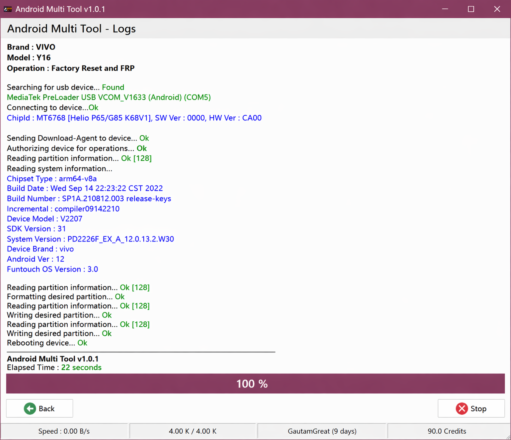
✔ Flash Firmware (Software Installation)
✔ Device Unlock (Pattern / PIN / Password)
✔ Factory Reset & Data Wipe
✔ FRP Reset (Google Account Removal)
✔ Mi Account Remove (Xiaomi Devices)
✔ Multi-Brand Smartphone Support
✔ Fast & Stable Server-Based Working
Android Multi Tool (AMT Tool) works with:
VIVO | XIAOMI | TECNO | INFINIX | ITEL | REALME | KARBONN | SAMSUNG | OPPO & MORE
👉 Designed for wide compatibility across Android smartphones.
Below is the current server authentication status for different operations:
| Server Name | Status |
|---|---|
| Infinix / Tecno / Itel Mediatek Auth | Online |
| Infinix / Tecno / Itel Spreadtrum Auth | Online |
| Oppo / OnePlus / Realme Secrecy Decrypt | Online |
| Oppo / OnePlus / Realme Demo Remove | Online |
| Oppo / OnePlus Mediatek Auth | Offline |
| Realme Mediatek Auth | Offline |
| Nokia Fastboot HMD Auth | Offline |
| Vivo Qualcomm / Mediatek Auth | Offline |
| Xiaomi EDL / BROM Auth | Online |
| Xiaomi Fastboot to EDL Auth | Online |
| Xiaomi Mi Assistant FRP Auth | Online |
| Transsion Anti Crack Fix Auth | Offline |
👉 Note: Server status may change based on updates.
✔ Server-Based Authentication System
✔ Supports Multiple Chipsets (MTK / Qualcomm / SPD)
✔ Instant & Secure Operations
✔ Professional GSM Tool
✔ Regular Updates & Improvements
Access the official Android Multi Tool platform for supported models, login panel, and latest updates. Secure and reliable for GSM technicians.
Android Multi Tool (AMT Tool) is trusted by mobile repair professionals because of its reliability, speed, and wide compatibility. Its server-based authentication system ensures secure operations and consistent performance.
It is an ideal tool for technicians who want an all-in-one Android servicing solution.
Q1. What is Android Multi Tool used for?
👉 Flashing, unlocking, FRP bypass, and Android repair.
Q2. Does it support multiple brands?
👉 Yes, it supports most major Android smartphone brands.
Q3. Is server required?
👉 Yes, internet connection is required for authentication.
Q4. Is this a physical product?
👉 No, it is a digital tool/activation.
Android Multi Tool (AMT Tool) – FRP flashing & Unlocking Gsm Tool
👉 gsmguru.in – Mobile Software Activation
Android Multi Tool activation
AMT Tool flashing tool
FRP bypass tool Android
Android unlocking software
GSM repair tool
👉 Digital Product Only (No Physical Delivery)
👉 Internet Required for Server Authentication
👉 Server Status May Change Anytime
👉 No Refund Policy Applicable



Reviews
There are no reviews yet.